
Privacy-First SoundCloud Experience
Overview
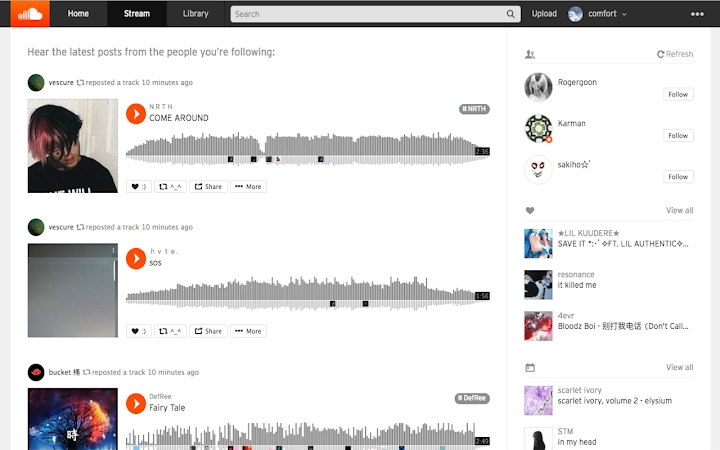
The SoundCloud Privacy Extension is designed to enhance the music listening experience by removing social metrics and notifications that can contribute to user anxiety or distraction. By hiding like counts, follower numbers, and message alerts, the tool allows users to focus purely on the music rather than performance metrics or social comparison. This is particularly beneficial for individuals seeking a more mindful and distraction-free environment while using SoundCloud.
Target users include music enthusiasts, content creators, and anyone concerned about digital well-being or social media fatigue. The extension operates directly within supported browsers, requiring no additional software or system changes. It is especially useful for those who use SoundCloud frequently but wish to disengage from the platform’s competitive metrics.
While the developer has not provided additional background information, the extension is available for Windows, Mac, and Linux systems, indicating broad cross-platform accessibility. Its primary function—removing visibility of user and track statistics—serves a growing demand for privacy-focused tools in social media environments.
Key Features & Capabilities
- Removes public statistics – Hides like counts, follower numbers, and play counts on SoundCloud tracks and profiles.
- Disables notification icons – Hides likes and messages icons while preserving their functionality.
- Non-intrusive toggling – Users can toggle the extension on or off via the browser icon, with immediate effect.
- Refresh-based activation – The extension takes effect after a page refresh, ensuring full visibility of changes.
- Minimal system footprint – With a file size of 1.2 MB, the extension is lightweight and efficient.
These features are ideal for users who want to reduce digital clutter and avoid comparison-driven stress. For example, a content creator can review their own tracks without seeing engagement numbers, enabling a more objective listening experience. Similarly, casual listeners can enjoy music without being prompted by social metrics.
The ability to still interact with hidden elements—by clicking where the icons were—ensures that functionality is not lost, only visibility. This design choice supports both privacy and usability, making it a balanced solution for users seeking a cleaner interface.
User Interface, Workflow & Performance
The extension integrates seamlessly into the browser environment with a minimal user interface. A small icon appears in the browser toolbar, allowing users to toggle the privacy mode on or off with a single click. The interface is straightforward, requiring no setup or configuration.
Workflow efficiency is high, as the extension activates immediately upon toggling. After enabling the feature, users must refresh the SoundCloud page to see the changes take effect. This refresh step ensures that the page renders with the updated layout, maintaining consistency.
Performance details were not specified by the developer. However, given its lightweight size of 1.2 MB and the fact that it runs only on SoundCloud, it is expected to have minimal impact on browser performance. The extension does not appear to run background processes or collect user data, aligning with its privacy-focused purpose.
Stability is maintained through standard browser extension architecture. No reports of crashes or conflicts were noted in the available information. Users can expect consistent behavior across sessions, with settings preserved between uses.
Compatibility & System Requirements
The extension is compatible with Windows, Mac, and Linux operating systems. It is designed to work with major modern web browsers, though specific browser names were not listed. Installation size is 1.2 MB, indicating a compact footprint that does not strain system resources.
Exact system requirements were not listed. The developer did not provide details about minimum CPU, RAM, or storage needs. Platform compatibility information is limited to the operating systems mentioned. Users are advised to ensure their browser is up to date to maintain optimal functionality.
Since the extension runs in the browser environment, it does not require administrative privileges or complex installation steps. It can be installed directly from browser extension marketplaces, streamlining the onboarding process.
Pros and Cons
Pros
- Effortlessly removes distracting social metrics on SoundCloud
- Preserves functionality while hiding visual elements
- Lightweight at just 1.2 MB
- Available for Windows, Mac, and Linux
- Completely free to use
Cons
- No detailed documentation or user guide provided
- Requires a page refresh to activate changes
- Compatibility with specific browsers not specified
- Limited customization options
- Developer background not disclosed
FAQ Section
Is the extension safe to use?
The extension operates within the browser’s security model and does not collect or transmit user data. It only modifies the display of elements on SoundCloud, making it a secure tool for privacy-focused users.
Does it work on all browsers?
While the extension is compatible with Windows, Mac, and Linux, specific browser support was not listed. It is recommended to check availability in your browser’s extension store.
Can I still interact with hidden features?
Yes. Although like and message icons are hidden, clicking on their original locations will still reveal the associated content or actions.
Is the extension free?
Yes, the extension is completely free to download and use. There are no in-app purchases or premium tiers.
How do I update the extension?
Updates are managed automatically through the browser’s extension marketplace. Users will receive the latest version when available.
Final Thoughts + CTA
The SoundCloud Privacy Extension offers a focused, effective solution for users seeking a distraction-free music experience. By removing social metrics and notifications, it supports digital well-being and encourages mindful listening. Its lightweight design and cross-platform availability make it accessible to a broad audience.
While it lacks detailed documentation and customization, its core functionality is reliable and well-executed. The ability to toggle visibility on demand adds flexibility without compromising usability.
For anyone who uses SoundCloud regularly and wants to reduce comparison fatigue or digital noise, this tool delivers a meaningful improvement. Download SoundCloud Privacy Extension now to reclaim your listening experience.







